Skip to content
AirtableBackup

Airtable backup

Every change to your Airtable base, saved and restorable.

AirtableBackup keeps a change history with a name on every change, shows any table as it was at any moment, restores one record or a whole base, and proves the restore works every night. Automations and scripts included. One flat price per base.

14-day trial, every feature on, no card.

Sign-up opens soon. Leave your email to be first.

Write to support@airtablebackup.com and say which base you want backed up first. A person replies within one business day. When sign-up opens, it is at app.airtablebackup.com/signup.

app.airtablebackup.com
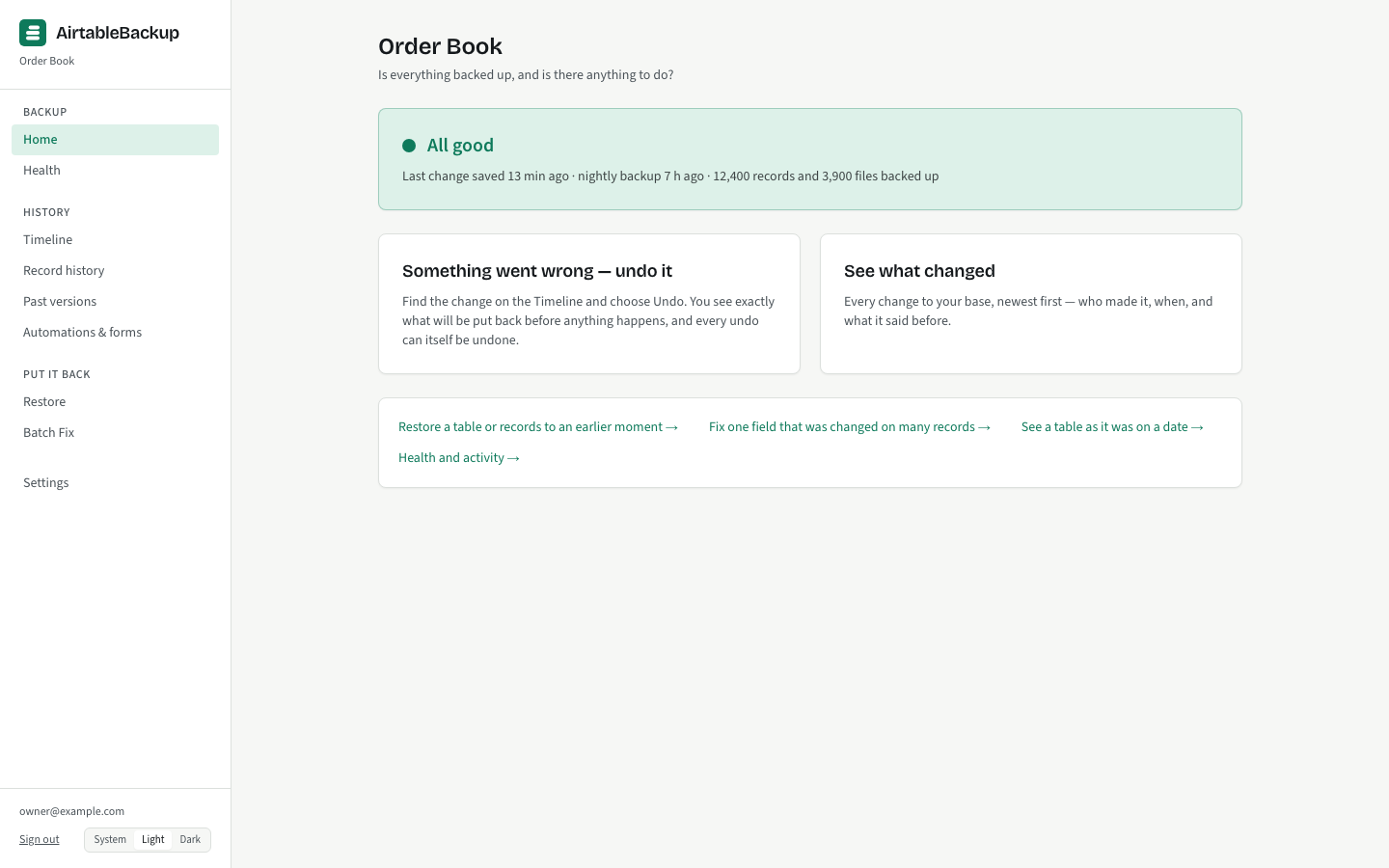
The console Home page: the verdict "All good" with the count of records and files backed up, when the last change was saved, and the two buttons "Something went wrong — undo it" and "See what changed".

Proof and completeness

Three things no other Airtable backup does

A change history with the author’s name on it

Every edit, addition and deletion is saved as it happens, with who made it: a person by name, an automation, a form, a synced table or an integration. Not a daily copy to compare against yesterday’s; the change itself, with the values before and after.
How live updates work →

A restore that is tested every night

Turn on the nightly restore test and, each night, 25 records of one table are restored from the backup into a test base in a workspace you choose, then read back and compared. A pass is a line on your Health page. A failure is an alert.

The nightly restore test →

Automations and scripts, backed up

Each automation’s trigger, actions and settings, and the source of every script action, saved nightly and versioned when something changes. Forms and interface page metadata too. The thing the community has asked every backup tool for.

The full coverage table →

“No other” is as of 2026-10-06, from the vendors’ own pages. ProBackup’s help article began listing automations that week; what it captures is not documented. The comparison says so.

What's in the backup

The whole base that the API can see, and a plain list of what it cannot

  • Records, fields and every change to them, with who made it
  • Attachments, stored once by content
  • Comments, schema, automations with script source, forms, interface pages
  • Not backed up: views, interface layouts, Airtable's own revision history

Every row of the coverage table says how it is captured in one sentence, and the gaps are named as plainly as the rest: views are not backed up, interface layouts are not backed up. The table is dated, because Airtable’s API moves.

The full coverage table

How a restore goes

From the Timeline to a verified restore in four steps

  1. Step 1 of 4

    Find the change

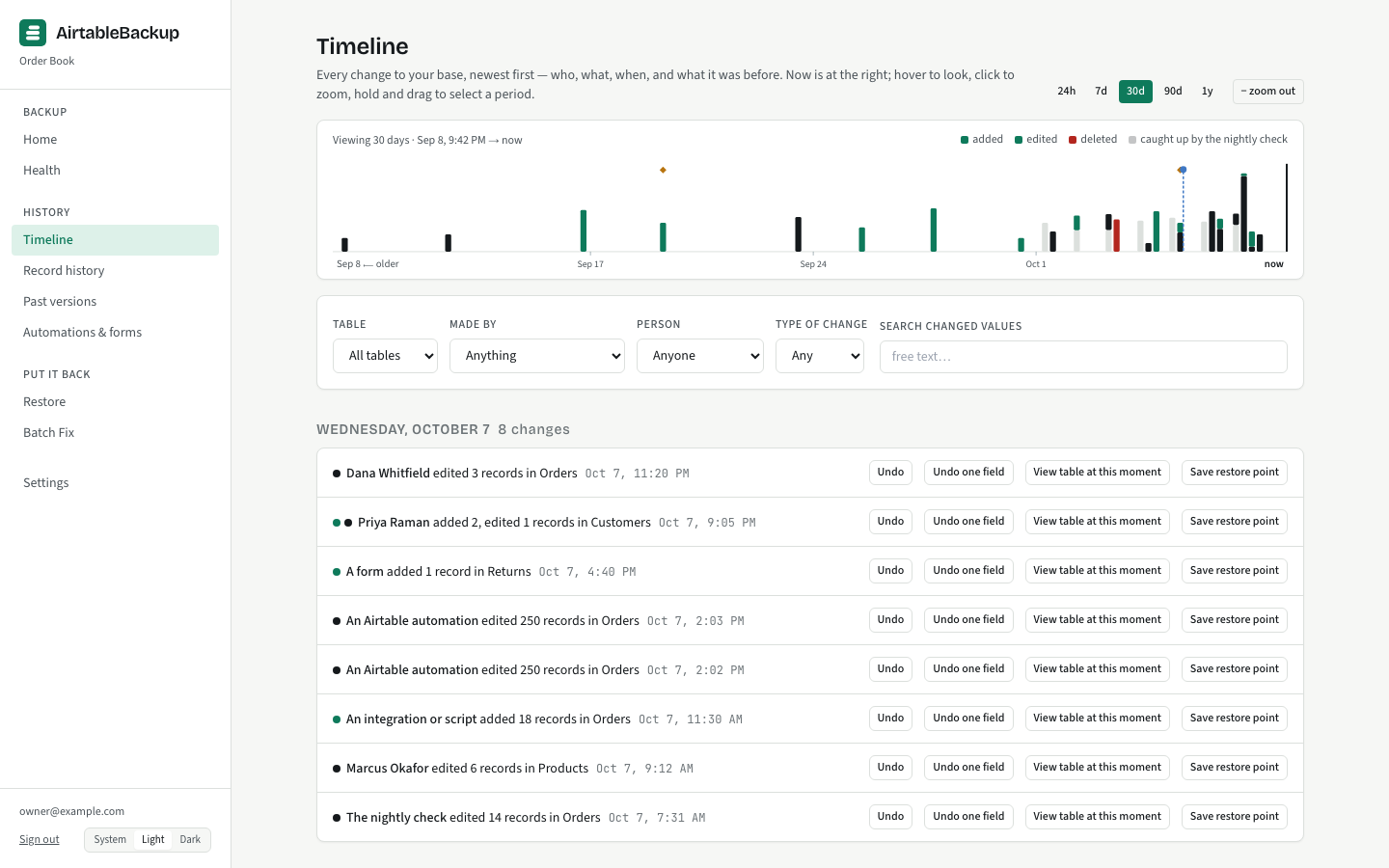
    On the Timeline, every change is a row with a name and a time. Search a record by name or paste its Airtable link to see its whole history.

    The Timeline: an activity graph by day above a feed of changes, each row naming who made it, what changed, and offering Undo, View table at this moment and Save restore point.
  2. Step 2 of 4

    Choose what to put back

    Undo one change, undo one field of it, or pick a table at any moment: a date, a time, or a restore point you saved earlier.

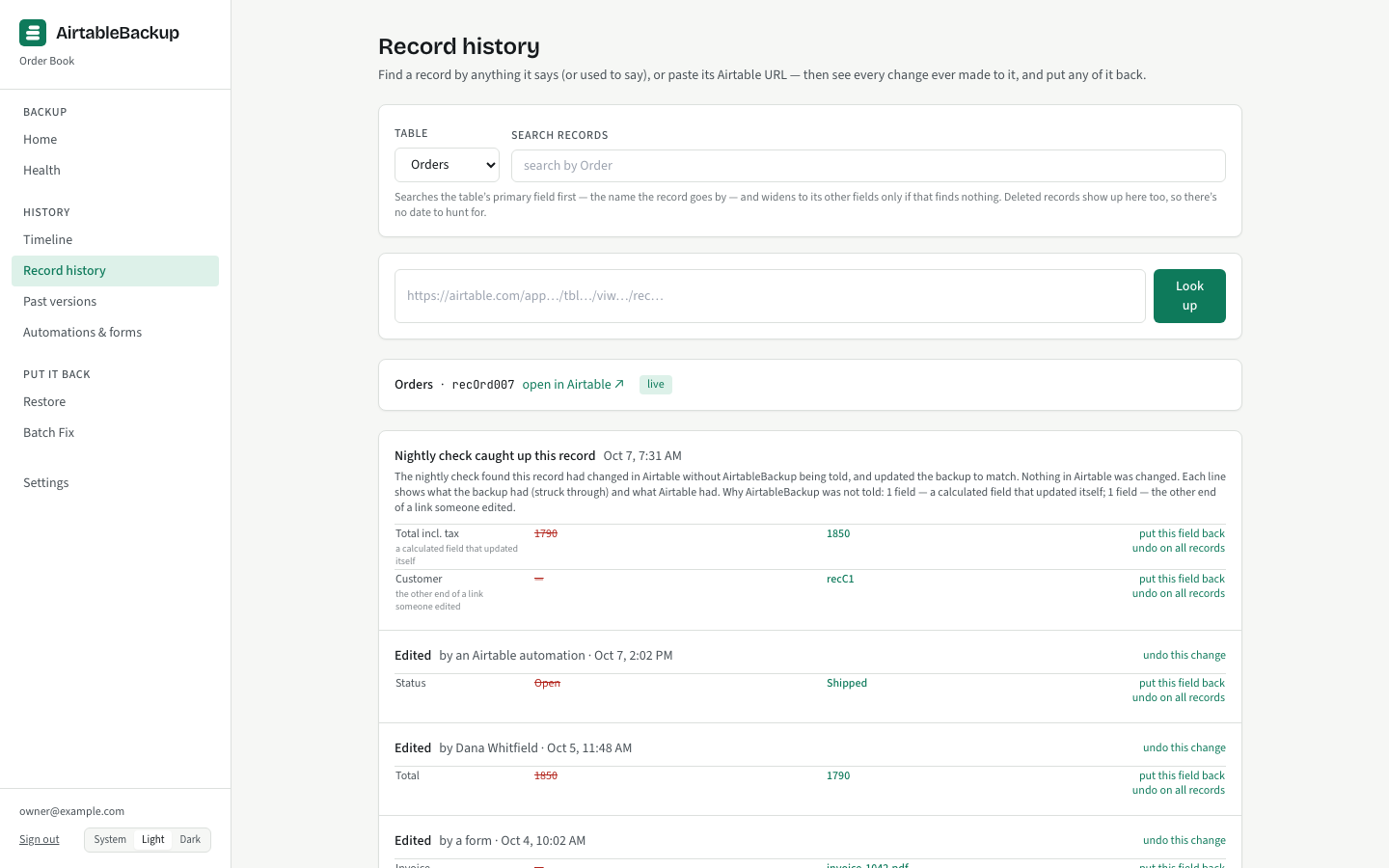
    Record history: one record found by name, with every change to it listed in order, each with the author, the time and the before and after values.
  3. Step 3 of 4

    Read the preview

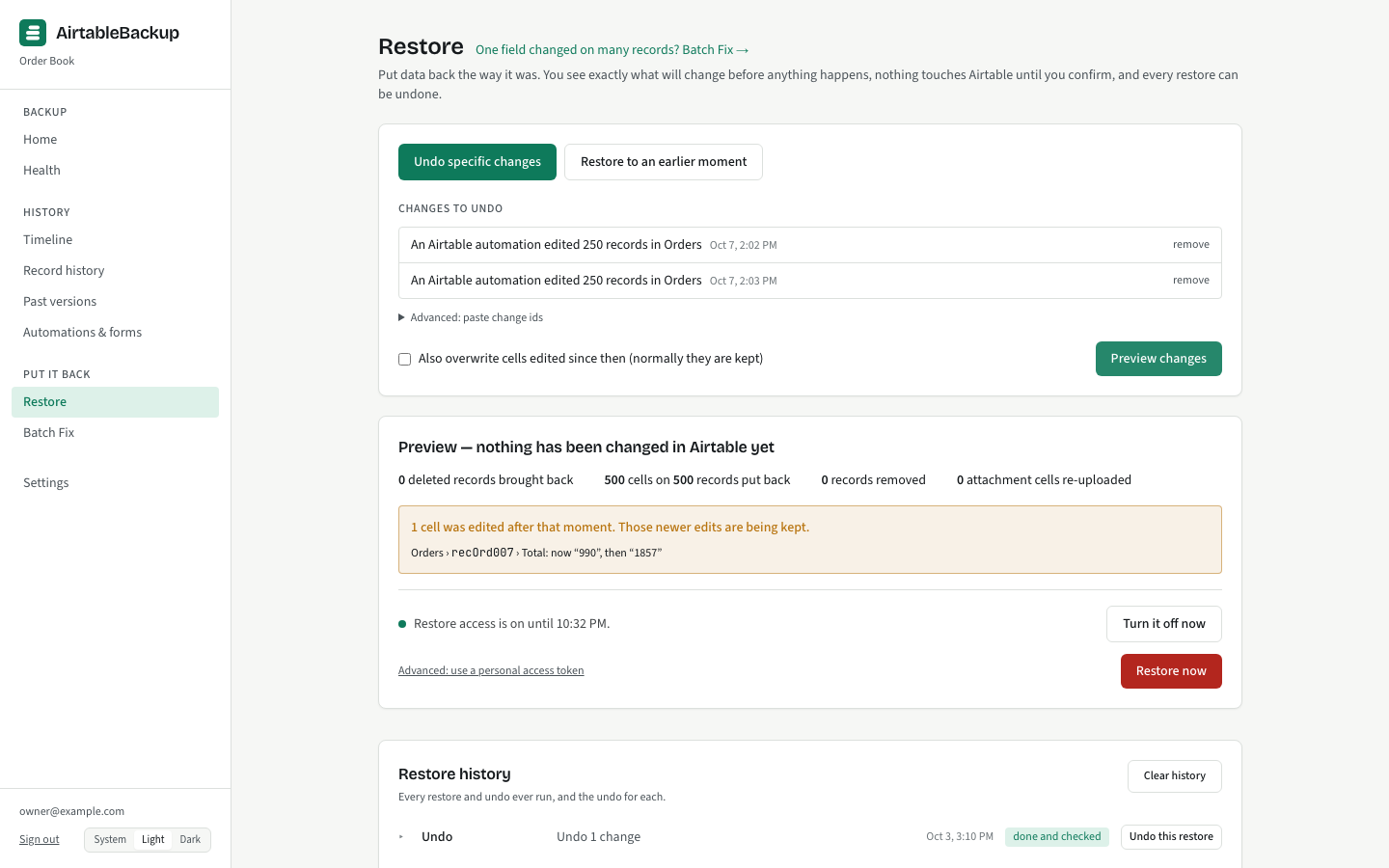
    Before anything is written, the plan is spelled out in sentences: what will be put back, what was edited since and is being kept, and anything the API cannot reproduce.

    A restore preview: the sentences "3 records will be put back" and "1 cell was edited after that moment — newer edits are being kept", above the Restore now button.
  4. Step 4 of 4

    Restore, then check

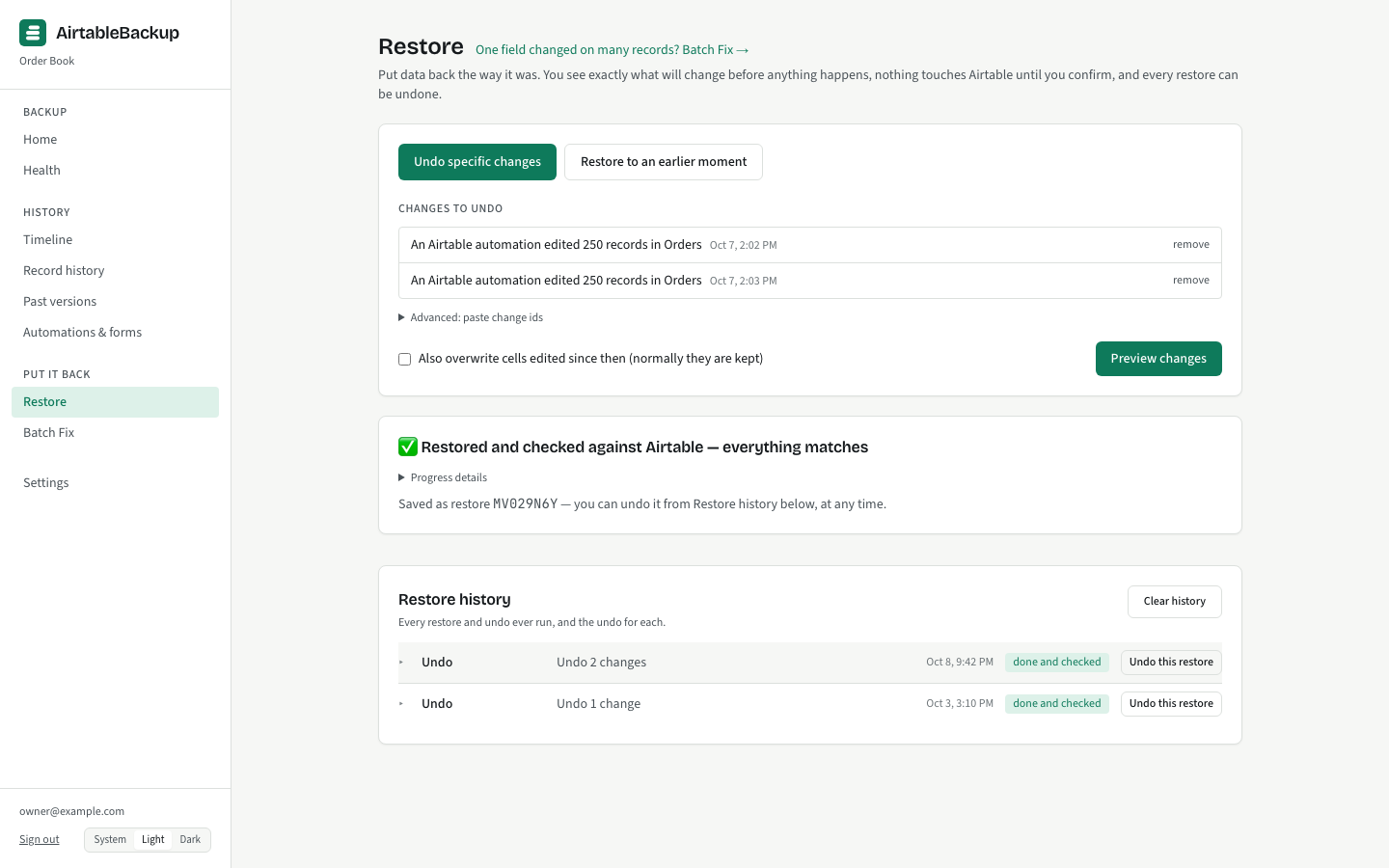
    You sign in with Airtable to approve the write. The restore is applied, read back and verified. Every restore can be undone from Restore history, and the undo is itself a restore.

    A finished restore: "Restored and checked against Airtable", the counts written and verified, and an Undo this restore link.

Everything a restore can do, including Batch Fix and a whole-base rebuild →

Compared

Where the market meters, and where it does not restore

AirtableBackupProBackupOn2Air BackupsBackup247Airtable's own snapshots
Price basis$19/base/month, flatStorage GB + retention tier, from $25/moBases, records, attachments, restores; daily from $49.99Connectors + 15 GB cap, from $29 (or $19)Included
Backup frequencyEvery change, live; full backup nightlyDailyMonthly to hourly by tierDaily or hourly by tierAbout daily, not controllable
Restore depthOne change, record, field, table at a moment, or whole base; undoableTable as a duplicate; records; computed fields skippedTables as new tables; no single record; 1–10 restores/monthRecord, table or base, in placeWhole base as a new base
AutomationsYes, with script sourceListed since Oct 2026; depth unverifiedNoNot listedYes, in the restored copy

Competitor facts observed on the vendors' own pages on 2026-10-06. Vendors change prices and features; check their pages before deciding.

Pricing

One plan. Everything in it.

$19per base, per month

$190 a base when billed yearly: 2 months free.

  • Every feature, on every base
  • Attachments not metered
  • Backup frequency not metered
  • History and restores not metered
  • 14-day trial, no card

The other services meter the three things that surprise people later: how much your attachments weigh, how often you want a backup taken, and how many times a month you may restore. Here none of those is a line on the bill. A base is a base.

The pricing page works the sum for a 22 GB base with 45,000 attachments, here and elsewhere, and explains what happens to your data if you stop paying: 14 days of grace, 30 days read-only, retained to day 90, then deleted.

Questions

Asked before signing up

What does "every change" mean?
Airtable notifies the service when a record, a field or a table changes, with the values before and after. Each notification becomes an entry in the change history with its author and time. At the Standard backup speed a burst of edits is saved about 30 seconds after the last one during working hours and within 15 minutes after hours; the Instant speed saves within seconds, day and night. A full backup is taken every night at every speed.
Is a nightly backup the same as a snapshot?
The words are used differently here on purpose. Airtable’s snapshots restore a whole base as a new base. The nightly backup here is a full copy of every record, taken each night, that sits under the change history so any table can be shown as it was at any moment, and so the nightly check can compare the backup with Airtable and explain every difference.
What is not backed up?
Views are not backed up: Airtable’s API does not expose filters, sorts, grouping or field order. Interface layouts are not backed up; interface pages and their metadata are. Airtable’s own revision history is not copied. The coverage table lists each row and how it is captured.
Can a restore damage my base?
A restore goes into a new table beside the original by default. Writing over the live table is an explicit choice, and even then newer edits are kept unless you choose otherwise, field by field. Before any write, the live state of everything about to be touched is saved, so every restore can be undone. Airtable’s API cannot delete a table or a base, so an empty table a restore created is yours to remove.
What is Batch Fix?
A page for the runaway-automation day: one field changed on hundreds of records by a script, an import or a person. You name the field, the window and, if you like, the actor, and the plan lists every record whose cell will be put back and every one left alone because someone else edited it since. Then one restore, undoable like the rest.
Who can see my backup?
Members of your account who are collaborators on the base in Airtable. A member who is removed from the base in Airtable loses access to its backup. Backing up needs read access only; a restore asks for your own Airtable sign-in, with write access that lasts at most an hour.
What does it cost?
$19 per base per month, flat, with every feature. Attachments, backup frequency, history and restores are not metered. Billed yearly it is $190 a base, two months free. The pricing page has a worked example for an attachment-heavy base.
Does backing up count against my Airtable API limits?
Live updates arrive by notification, which costs almost nothing while the base is idle. The nightly backup reads every table once. The backup speed setting trades how quickly a change is saved against how often Airtable is asked; Light and Minimal exist for bases that must stay well inside their limits.